
Build - Navigation Enhancement & Cache Bug Fix
 Tom Gobich
Cache Bug Fix
I believe the origins of the cache bug that's been impacting some Build updates has finally been found and fixed. The bug occasionally occurred when making changes to an already cached version of a Build site (meaning it's been viewed). The change would attempt to clear out all the required cached items, but when this error happens, one of the template-level caches gets excluded leaving it with outdated information which results in an error screen.
I believe I've sourced this bug back to an alteration I made to expand Build functionality for Grow which resulted in Widget Clipboard items getting included in template cache data. This itself didn't cause the error, however, clipboard items belong to the page and not any one template, so when one template was changed, the clipboard widgets would shift but still exist in the cache of other template items, which is what ultimately led to the error.
This is now being scoped specifically to Grow, and will no longer impact the other sites. In addition to this change, I've also gone through and added additional cache clearings for the template-level Microsite caches.
Navigation Enhancement
A structural enhancement has gone out for Microsites containing a navigation bar on desktop devices. The navigation bar now spans the full height of the page and will stick to the top of the page as you scroll. To allow space for this, strip content will now start directly to the right of the navigation bar and span the remaining width.
This change was primarily made to remedy a structural issue in cases where the navigation was taller than the Template 1 content. In these cases, the navigation would cause empty space between Template 1 and Template 2 or Template 1 and Strip 1 since previously the navigation was inserted along with Template 1's content.
GardnerWeb, Gardner Intelligence, and Microsites not containing a navigation have not been impacted and will display the same as they did prior to this release.
Distribute Photo Instructions & Export Document
Tom Gobich
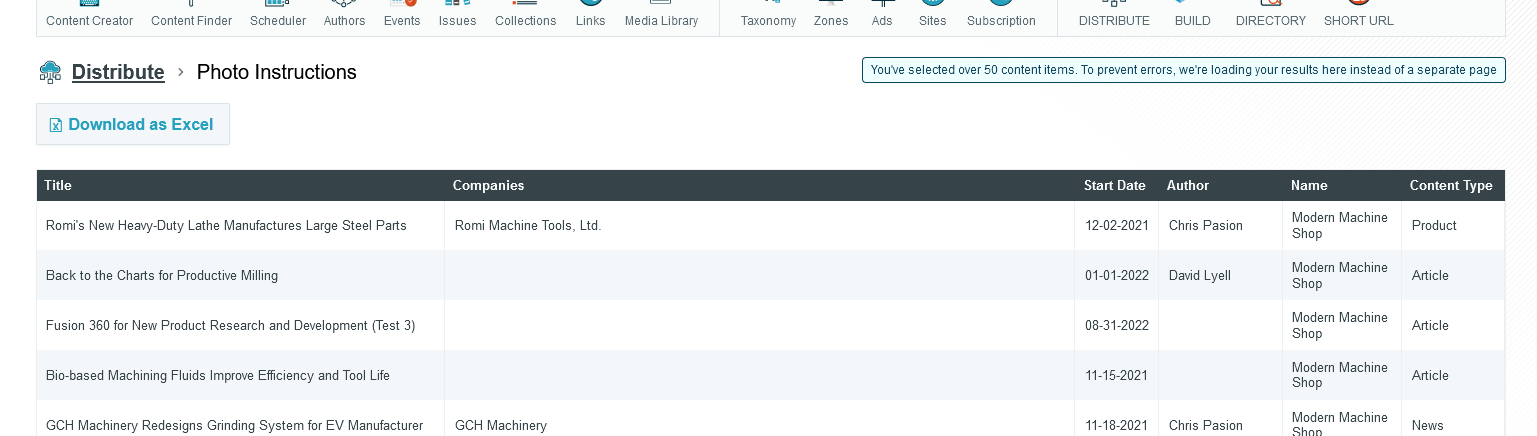
Distribute has had an issue where if you select near or over 50 content items, you'd run into an errored page due to the length of the URL exceeding the allowed character limit.
This issue has now been fixed for the Photo Instructions and Export Document actions, as these are the two actions most likely for this to occur.
If you should select under 50 content items, these actions will behave as usual by opening the results on a new page where they can be re-ordered and exported. However, if you select over 50 content items, these actions will now be loaded on the same page to bypass the URL character length limitation. You'll still be able to re-order and export the items. When this occurs a note will be added to the page to signal this was intentional and not without reason.
Distribute Updates & Fixes
Tom Gobich
Fixes
- Fixed an issue with the Query Builder where OR statements applied to the same group didn't work properly. This was accidentally broken as a part of yesterday's updates adding the Non-Published filter.
-
Fixed
an issue with the Query Builder where future dated published content
was getting included by default. Future dated content should've been restricted
to when the Non-Published filter is included in the query builder.
Updates
Improved the way errors are handled. Prior to this update if the Query Builder was converted into invalid SQL, zero results were returned for the query and no notice of an issue was given. Now, an error is captured and displayed (as shown below). This is now also being logged for us developers with information about the query so that we can easily replicate what led to the error.
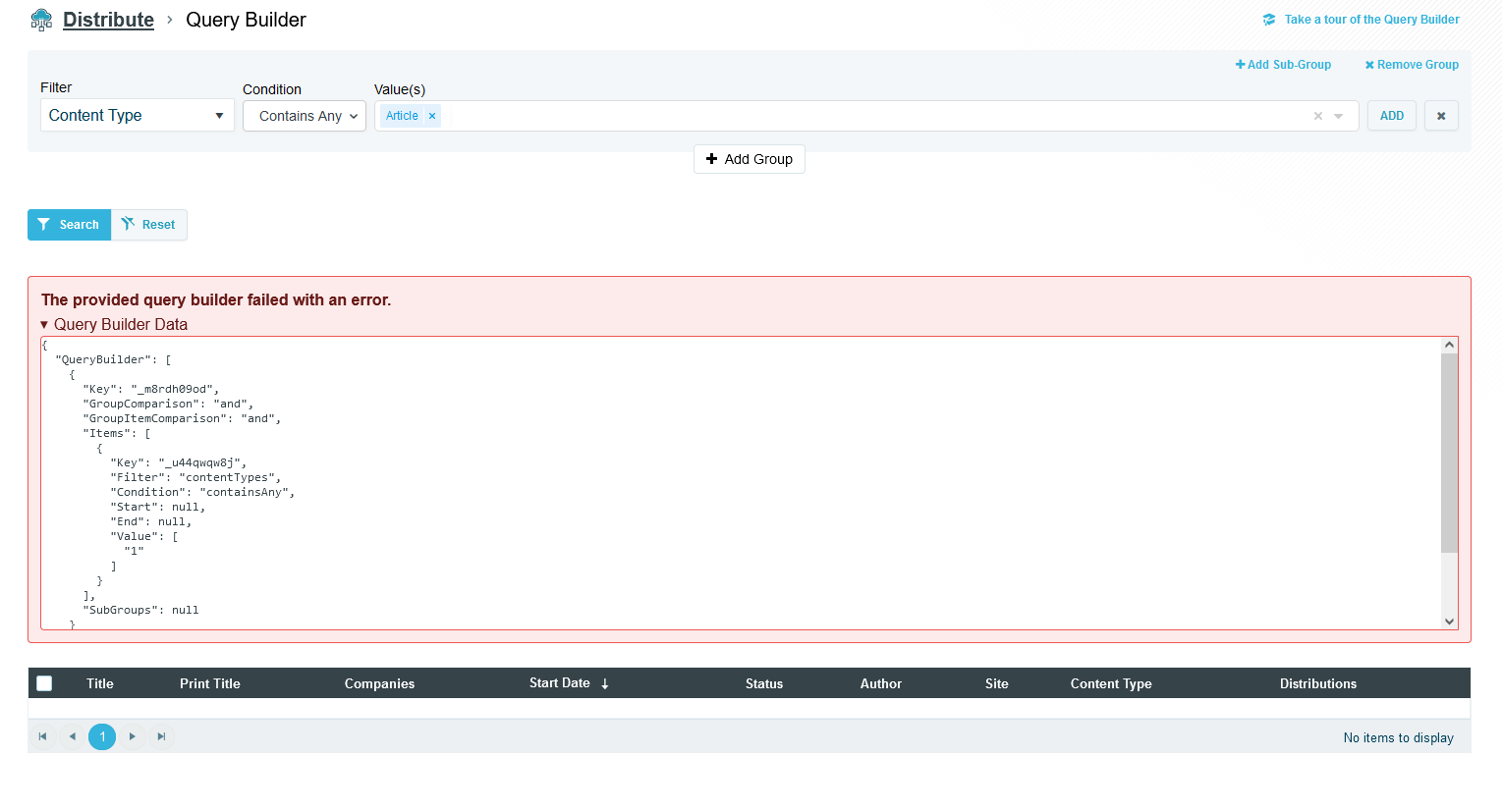
The above error was forced for demonstration purposes.
Data Tables Have Been Updated
Tom Gobich
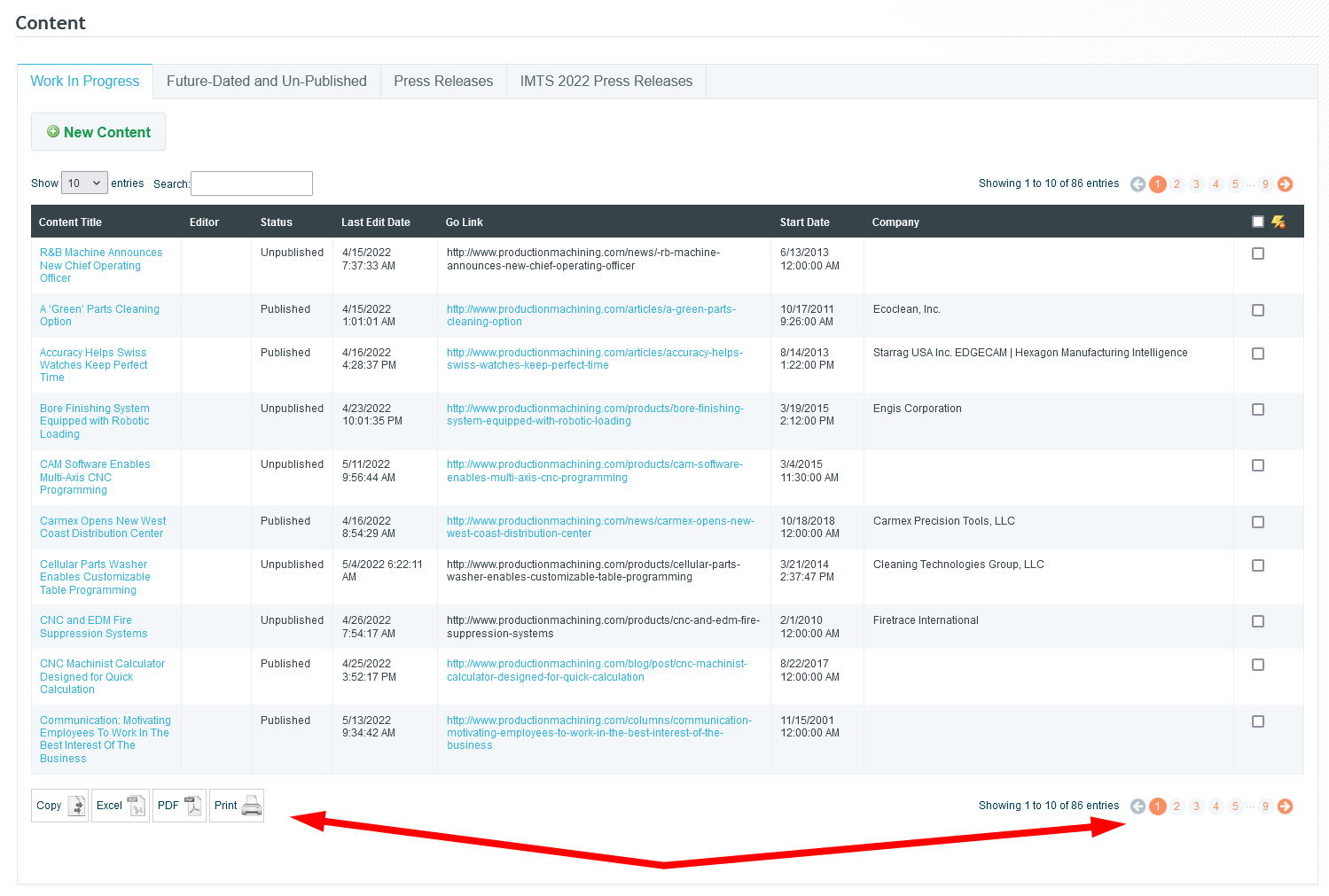
Today we updated the library we use to put together data tables within Dash. These tables are those you find on the Content Work In Progress page and the like. Prior to today, we used a very outdated version of this library that was still attempting to utilize flash. Because of this the copy, excel, and pdf buttons didn't work and haven't since flash was removed by browsers a few years ago.
With the updated version of this library, flash is no longer required for these buttons. As a result, these buttons are now back up and working. This updated version also brings improved pagination, so you can directly jump to a particular page and even the last page.
This update impacts the following Dash pages:
- Content - Work In Progress & Future-Dated tabs
- Content Finder
- Authors
- Collections
Dash Image Library Search Bar
The Image Library Search Bar will now be reset to an empty state when opening/re-opening the Image Library. The Search Bar will also now have a blue background color when the Image Library is filtering on the search Bar. These changes were added to hopefully solve an issue where the image library looks empty after inserting a few images, which I believe was caused by unintentional filtering.
The below pages were impacted by this bug, though it was most prominent on the content creator. The bug has now also been fixed on each of the below pages.
- Content creator
- Event editor
- Issue editor
- Build editor
- Link editor
- Zone editor
Dash Image Library Select/Insert Bug Fixed
Tom Gobich
A bug impacting performance and the ability to insert images into the content body within the content editor has now been fixed. This fix also resolves the issue where the image caption was getting applied numerous times.
The issue stemmed from a new "change" handler getting bound to the Image Library every time it opened. This bug has been around for a while and copy/pasted throughout Dash but only recently began manifesting itself when a new feature was introduced to save and load alt text, caption, and other image information as this slightly slowed down the "change" handler's completion time.
The below pages were impacted by this bug, though it was most prominent on the content creator. The bug has now also been fixed on each of the below pages.
- Content creator
- Event editor
- Issue editor
- Build editor
- Link editor
-
Zone editor
Build Ad Shuffle & Positioning
Tom Gobich
Ad Shuffle
A new flag has been added underneath the ad collection field within Build to turn on/off the shuffling of ads. This new flag has been defaulted to on (checked) for all preexisting microsites since this was the default behavior prior to the addition of this flag.
For example, in the above screenshot, the "shuffle ad order" checkbox is unchecked, so the ads will pull and display in the order they're listed within the ad collection.
Ad Positioning
I've also fixed an issue related to ad positioning. We have a script that checks whether or not an advertisement will fit next to a microsite's template. If it doesn't the script will move the ad down to the next template to prevent adding whitespace to the template's content.
Prior to today this script was using the advertisement's native image size instead of the size the image is displayed at when determining if an ad would fit. When the ad's native size was big enough, this was causing the ad to be moved to the next template in some cases where it didn't need to be. This script is now using the image's display dimensions instead of the native dimension's so this should no longer be happening.
Image Library
A fix has been deployed for the Image Browser for WYSIWYG editors and the Media Library. One issue that has been fixed was the creation of multiple instances of the Image Library. This was causing actions, like delete, to be performed on images other than what was currently selected. For delete, the popup now will only be displayed for the currently selected image. Another issue that was fixed was the create and delete options for images failing to properly complete. This caused them to be repeatedly performed, sometimes reverting previous actions. Both of these issues have been fixed and the Image Library is working as intended.
Cursor Jumping & Undo/Redo Scroll Position
Tom Gobich
A fix was deployed this afternoon to fix an issue with the Change Detection plugin on the WYSIWYG editor. This issue occurred when you double-clicked a word to select it with change detection enabled and started typing to replace that word. In some cases, the cursor was jumping to the end position of a sibling element within the paragraph. The cursor will now properly remain at the start or end boundary of the word being replaced. This fix is in place for all current and future content.
Another issue has also been fixed with the undo/redo functionality. When hitting undo or redo, the content would flash and you could end up at a completely different portion of the document then you were before. With this fix, the content will still flash since undo/redo works off stored snapshots of the entire document. However, the position is now properly maintained and you're no longer jumped to random portions of the document. This fix will apply to all future content. This issue was found when investigating another issue with the undo/redo functionality where in rare cases undo would go back more than one step. We're still investigating that issue.
Build Fixes & Improvements - 9/24/21
Tom Gobich
Bug Fixes
Most of these bug fixes are edge cases that require a certain flow to be followed in order to have run into them. However, always better to have them fixed than lingering around.
- Fixed an issue where you couldn't edit a widget if the Microsite's alias in "Basic Info" was empty.
- Fixed a cache issue where if you previewed a public page and the previewed version got cached, when viewing the public version it would use the preview cache resulting in the menu linking to preview pages.
-
Fixed a cache issue when linking to another Microsite or Microsite page inside Image + Head + Deck, Head + Deck, or a manual field in the Story Grid. If the linked-to page is private/in-review on the current cache then made public the widget was failing to update accordingly resulting in the widget not displaying on the public version.
New Features
-
You can now swap strip positions on a page. For example, you can swap Strip 1 with Strip 3 and visa-versa. There is a new button within the strip template panel called "Swap Position" that will ask you which position to swap with, then initiate that swap.
-
You can now change the visibility of all pages at the same time by clicking the root page in the Pages tree to open its context menu. A new option resides within the context menu called "Change Microsite Visibility" that, when clicked, will open a modal asking what to set the visibility to for every page in the microsite.
-
You can now instruct Build to tell search engines not to index a Microsite or Microsite page. A new checkbox has been added within the "Basic Info" and "Page Info" panels called "Exclude From Search Engine Index" that will add a meta tag to the page containing "noindex, nofollow" which will instruct search engines not to index the page so the page won't display within search engine results.
Enhancements
- When you clicked "Edit Content" on a widget it used to take a second for the page to open the modal because it waited for the modal to be ready before displaying it. Now, when clicked, the modal will open immediately and show "Loading" to signal that the click actually worked and something is happening. Then, once the modal is ready "Loading" will be replaced with the edit form.
- When changing the "Content Selector" radio selection in a widget edit form it used to take a second for the old selection's fields to be removed and replaced with the new selection's fields. Now, when changed, the old fields are immediately removed and replaced with "Loading". Then, when the new selection's fields are ready "Loading" is then replaced with those fields.
- The styling on the page's menu has been slightly tweaked to fit more characters on a line before line-breaking, provide better contrast on hover, reduce the massiveness of the drag-and-drop icon.
- The styling on the page menu's context menu (what displays when a page is clicked) has been slightly tweaked to improve contrast and fit more items vertically in a smaller area.
Dash Change Detection Was Including Edits When Copy/Pasting
Tom Gobich
Previously, when change detection was enabled in the body WYSIWYG editor, if you removed or altered characters then copy/pasted the text the removed characters would be pasted back in. This issue is now fixed and the removed characters will be excluded from the pasted text.
 Powered by ChangeCrab