
Adding Event Registration to Zones/Microsites
You can now add an event's registration details to the zone overview when using the 'new' landing page display (zoneDesign2) and within a 1x3 microsite widget. This can be done by creating a link between events and the chosen microsites/zoneContent pages and then choosing to display the event registration.
See the following PDF for more info on how this can be done: https://gbm.media/ChangeCrab-4-27-2023
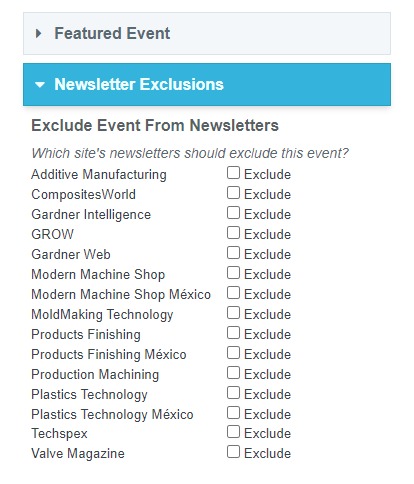
Events ExcludeFromNewsletter
The Events and Webinar Edit Pages now have an additional card for excluding the event from Newsletters. Simply check the boxes for the site's newsletters that should not display the event.
This comes into effect when a newsletter is grabbing events from a particular site. The ExcludeFromNewsletter field for the given event-to-site relationship must be false to be chosen.
On Demand Webinars
 Tom Gobich
A number of changes have been made to better support On Demand Webinars.
- An "On Demand" checkbox has been added to the webinar form in Dash.
- When unchecked, the form will display the same as before
- The Date & Time field and Embed Position field will disappear when checked. Instead, a Promotional Period field will display. You can use this to set what date range the On Demand webinar should be promoted. Additionally, the Embed Code field will switch from expecting a registration form embed to a video embed. The video embed will display the On Demand webinar within our brand sites.
- On Demand webinar's red action button will read "View Now" instead of "Register"
-
On Demand webinars within their promotional period will be displayed within the "New & Upcoming" section. They'll also be considered for newsletter pulling
Dash Image Library Search Bar
The Image Library Search Bar will now be reset to an empty state when opening/re-opening the Image Library. The Search Bar will also now have a blue background color when the Image Library is filtering on the search Bar. These changes were added to hopefully solve an issue where the image library looks empty after inserting a few images, which I believe was caused by unintentional filtering.
The below pages were impacted by this bug, though it was most prominent on the content creator. The bug has now also been fixed on each of the below pages.
- Content creator
- Event editor
- Issue editor
- Build editor
- Link editor
- Zone editor
Dash Image Library Select/Insert Bug Fixed
Tom Gobich
A bug impacting performance and the ability to insert images into the content body within the content editor has now been fixed. This fix also resolves the issue where the image caption was getting applied numerous times.
The issue stemmed from a new "change" handler getting bound to the Image Library every time it opened. This bug has been around for a while and copy/pasted throughout Dash but only recently began manifesting itself when a new feature was introduced to save and load alt text, caption, and other image information as this slightly slowed down the "change" handler's completion time.
The below pages were impacted by this bug, though it was most prominent on the content creator. The bug has now also been fixed on each of the below pages.
- Content creator
- Event editor
- Issue editor
- Build editor
- Link editor
-
Zone editor
Event Calendar
Tom Gobich
A calendar view for events has been added to Dash. You can find it on the Events page within the Calendar tab. By default, the calendar will show events across all sites and will show both events and webinars. However, you can filter down by one or more sites and one or more specific event types.
When you double-click on an empty space within the calendar, a modal will pop open with three action options.
1. Create Note, which is the default option. With this you can add a note to a specific day.
2. Create General Event.
3. Create Webinar.
Applicable fields will display depending on the selection. When creating a new event or webinar, once you hit save the event/webinar will be created with the name, start, and end date (if applicable). Once the event is successfully created, you'll be redirected to the full event/webinar edit screen so you can complete the remaining applicable fields.
This is partially still in progress, I'm looking into why events aren't displaying within the day and week views if the event spans more than one day. Though, this may just not be supported by the calendar library we're using.
---
Update: 2/14/22
Multi-day events are now properly displaying within the day and week views on the calendar. I've also added color differentiation between general events (blue) and webinar events (teal) and improved the link coloring for each. Lastly, a US/MX prefix has been added to note whether an event is for US or MX brands.
Webinar Updates Part 2
Tom Gobich
Default Sponsor Logo
When you add a new sponsor to a webinar, the system will check to see if the sponsor's showroom has an attached logo. If it does, it'll default to using the sponsor's showroom logo. When this happens and the showroom logo is being used, a note "Defaulting to Showroom Logo" will be displayed under the logo.
This can be easily replaced by selecting a different logo from the Image Library.
Presenter Updates
The presenter form has been completely reworked. The form's length has grown since it was initially created and the presenter descriptions are longer than I had initially imaged them to be. Due to these reasons, I've moved the presenter form off into a modal. This gives both the presenter preview and the form more horizontal room so that both aren't squished next to one another.
To add a presenter, now click the "Add Presenter" button in the top-right corner of the presenters section. This will open the modal.
Also new is the ability to search and select a presenter that's already been entered into the system. To differentiate between the two there's now a "What would you like to do" question prefixed to the top of the form when adding a new presenter. This will not display when editing a presenter. The old form will display when selecting "Add a new presenter".
Webinar & Event Updates
Tom Gobich
A fresh batch of webinar and event updates went out today for all sites. Details are below.
Sponsors
The Sponsor(s) section was altered to allow multiple sponsors to be entered within Dash and displayed on the detail page. When a sponsor is selected there will now be a new logo field specific for that sponsor. This new logo field replaces the old "Sponsor Logo" field. On already entered webinars the "Sponsor Logo" field will remain visible, though renamed to "Legacy Sponsor Logo". On newly created webinars, or webinars updated to use the new sponsor-specific logo field the legacy sponsor logo field will be removed.
Additionally, sponsor logo alt text will now default to [Company Name] + Logo.
Lastly, for the sponsors, the autocomplete was changed to include all supplier directories. Results will be grouped by the directory and the same company may appear under different directories. Please be sure you're selecting the correct company under the correct directory.
Presenters
The presenter image field now uses the Image Library. Additionally, the image editor has been added here with a 1:1 ratio crop (square crop). A simple WYSIWYG has also been added for the biography field consisting of bold, italic, and link tools. If more tools are needed here, please let me know. Lastly, the edit and delete buttons for the presenter's positions were changed (non-visually) to give the biography preview more space.
Misc
- All image fields for webinars and events have been switched to the Image Library.
- Fixed an area where the alias tool wasn't rigged up correctly (featured events)
- Fixed how events that start and end on the same date are displayed, they'll now display October 13 instead of 13 - 13.
 Powered by ChangeCrab